
Standardizing simple slopes and conditional indirect effects in AMOS
A correctly labeled path can still give you a slope in the original units. Decide which units belong in your report, then put the conversion in the AMOS expression. The TFL example shows how to check the expression and find its bootstrap results.
Start readingStart with the expression
In the screenshot, TFL_low = p.aT + p.intT * (-1.158) returns the slope of TFL for CSE at Wc = −1.158. Both parameters are in the original units. Selecting Standardized estimates changes which built-in estimates you see in the diagram. The expression you entered stays the same.
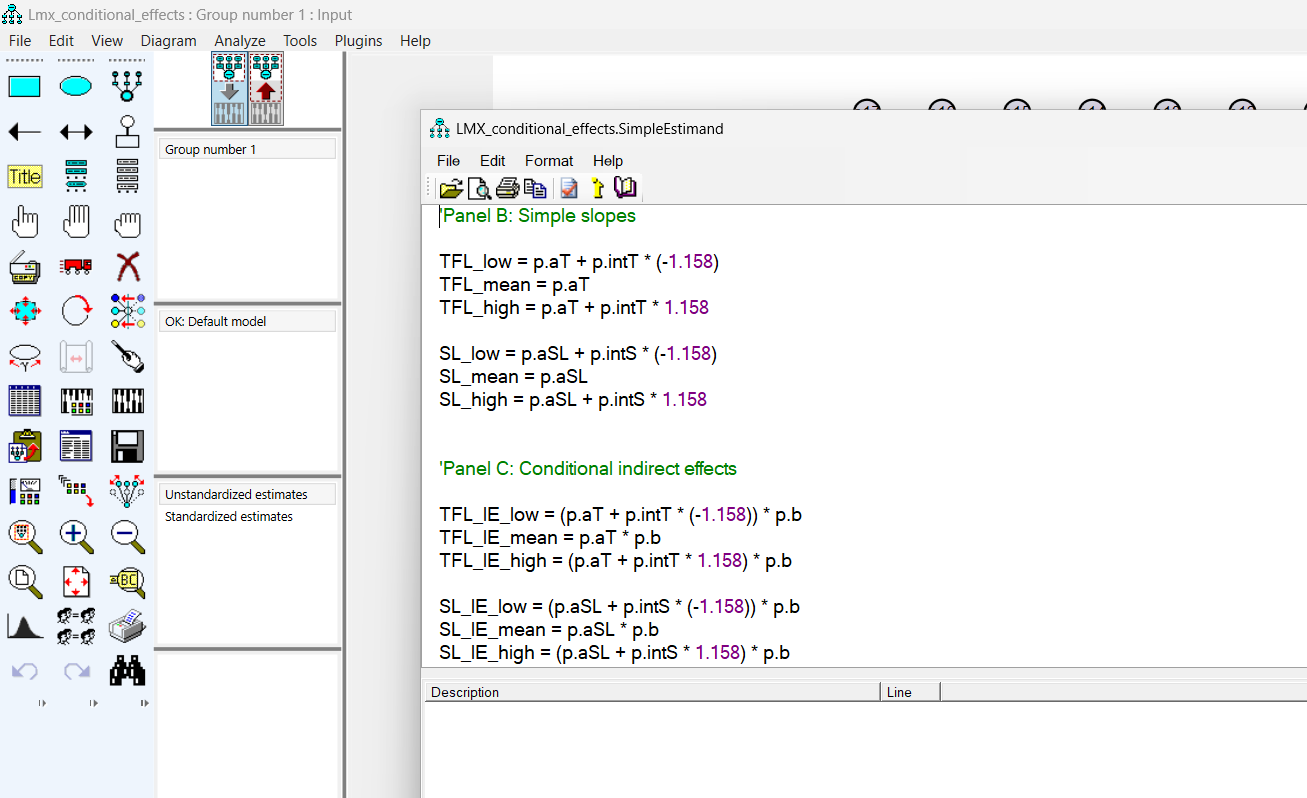
Check a built-in standardized path before writing a longer expression. For example, e.StandardizedDirectEffect(Y, CSE) returns the path from CSE to Y. The outcome comes first. Compare it with Standardized Regression Weights for the same fitted model. (Amos Development Corporation, n.d.-c)
Choose the two variables to rescale
To interpret a slope per standard deviation of TFL, first compute the original-unit slope at the chosen W. Multiply by the standard deviation of TFL and divide by the standard deviation of CSE. For an indirect effect on Y, use the standard deviation of Y in the denominator. The CSE standard deviation cancels when the two paths are multiplied under the same scaling convention. (Friedrich, 1982)
| Quantity | Original scale | Standardized units |
|---|---|---|
| TFL → CSE slope | 0.1842 | 0.1842 × 0.80 / 0.60 = 0.2456 |
| TFL → CSE → Y indirect effect | 0.0921 | 0.0921 × 0.80 / 0.90 ≈ 0.0819 |
The table uses aT = 0.30, an interaction coefficient of 0.10, b = 0.50 and hypothetical marginal standard deviations. At the chosen Wc, 0.2456 is the slope in CSE standard deviations per TFL standard deviation. The value −1.158 remains in the centered original units of W. Use a z-scale probe only when the moderator in the model has been converted to that scale.
Here the standard deviation is the square root of the model-implied marginal variance. e.ImpliedCovariance(CSE, CSE) retrieves the diagonal entry of the implied covariance matrix. The residual variance of CSE is only one component. Name the source of the standard deviations in your table because implied and sample values can differ. (Amos Development Corporation, n.d.-a)
Define and check each expression
Label the TFLc → CSE path aT, the TFLc × Wc product path intT, and the CSE → Y path b. Match the names to those in your diagram. In these expressions p. refers to a named parameter, and e. retrieves a quantity such as an implied variance or standardized path.
b_std_check = e.StandardizedDirectEffect(Y, CSE)
TFL_low_stdXY = (p.aT + p.intT * (-1.158)) * Math.Sqrt(e.ImpliedCovariance(TFL_c, TFL_c) / e.ImpliedCovariance(CSE, CSE))
TFL_IE_low_stdXY = (p.aT + p.intT * (-1.158)) * p.b * Math.Sqrt(e.ImpliedCovariance(TFL_c, TFL_c) / e.ImpliedCovariance(Y, Y))
Open Define new estimands from the status bar, enter the lines and select Check Syntax. Fit the model with b_std_check first. Add the two low-W expressions once that result matches the standardized CSE → Y path in an admissible solution. Use a decimal point in AMOS expressions. (Amos Development Corporation, n.d.-b) (Amos Development Corporation, n.d.-d)
Download the AMOS expressions (.txt). The file also covers SL and the other probe values. Check your variable names and probe values before using it with your data.
Find the matching bootstrap row
For a case bootstrap at a fixed probe, AMOS re-estimates the paths and implied variances used in the expression on each valid resample. The value −1.158 remains fixed. Recomputing the mean and standard deviation of W on each resample would define a different target.
In Text Output → Estimates → Scalars → User-defined estimands, find the row by its expression name. Read the estimate, then locate the same row under Bootstrap standard errors and in the confidence interval table for your bootstrap option. Report the method by name. The BCa label requires an acceleration correction in addition to bias correction. (Amos Development Corporation, n.d.-d) (Efron, 1987)
Keep the estimand name, W value, estimate, bootstrap standard error and both interval limits together. If a row differs from your hand calculation, check the path definitions and variance source before interpreting the number. The next guide uses the same model to read conditional indirect effects and the index of moderated mediation.
References
- Amos Development Corporation. (n.d.-a). ImpliedCovariance method. AMOS documentation.
- Amos Development Corporation. (n.d.-b). Simple user-defined estimands. AMOS documentation.
- Amos Development Corporation. (n.d.-c). StandardizedDirectEffect method. AMOS documentation.
- Amos Development Corporation. (n.d.-d). User-defined estimands [Tutorial]. AMOS tutorial.
- Efron, B. (1987). Better bootstrap confidence intervals. Journal of the American Statistical Association, 82(397), 171–185. DOI.
- Friedrich, R. J. (1982). In defense of multiplicative terms in multiple regression equations. American Journal of Political Science, 26(4), 797–833. DOI.